Part of my ongoing journey through Bryan Krausen’s HashiCorp Vault for Absolute Beginners on Udemy. This session covered Vault Tokens — the core authentication mechanism that controls access to everything inside Vault.
I ran through token creation, policy binding, orphaned tokens, TTL renewal, and revocation in a home lab environment. Here is everything I learned.
What Are Vault Tokens?
Tokens are the core method of authentication in HashiCorp Vault. Almost every operation requires a valid token — they act as the gatekeeper. When a client authenticates to Vault (via any auth method — LDAP, AWS IAM, GitHub, etc.), Vault generates a token and returns it to the client. That token is what the client uses for every subsequent request.
A few important things to understand upfront:
- The Token Auth method is always enabled and cannot be disabled. Every auth method ultimately produces a token.
- Tokens can be used alongside other identity providers (IdPs). The token is simply the representation of an authenticated identity inside Vault.
- Every token is associated with one or more policies, which define exactly what operations the token holder is allowed to perform.
How Tokens Work in Practice
The flow looks like this:
- A client authenticates to Vault using any supported method
- Vault generates a token with policies attached and a TTL indicating how long it remains valid
- The client presents that token on every subsequent request
- Vault validates the token, checks its policies, and if authorised, fulfils the request — for example, returning a database password that the application can use to connect
There is no need to re-authenticate on every request. Present the token and Vault handles the rest. This is similar to a hotel key card: you verify your identity at check-in, receive a card, and that card gives you access until it expires — no need to return to reception for every entry.
Types of Tokens
Vault has three token types, each identifiable by its prefix.
Service Tokens (hvs.)
Service tokens are the default token type. They are written to storage, meaning Vault tracks them explicitly. They support the full set of token features — renewals, revocations, child tokens, and accessors. The tradeoff is slightly more read/write overhead compared to batch tokens.
Use service tokens when manageability matters more than raw scale.
Batch Tokens (hvb.)
Batch tokens are encrypted binary large objects (BLOBs). They are not written to storage, which makes them significantly lighter and more scalable. Vault does not track batch tokens individually.
The tradeoff: batch tokens have limited features. They cannot be renewed, cannot have child tokens, and cannot be looked up by accessor. They are ideal in high-scale scenarios — for example, thousands of ephemeral workloads each needing short-lived access.
Recovery Tokens (hvr.)
Recovery tokens are generated during disaster recovery scenarios (covered in the previous post on Auto-Unseal). They are not used for day-to-day authentication.
Token TTL and Token Hierarchy
Time to Live (TTL)
Every token has a TTL — a lifespan after which it is no longer valid. When a token expires, Vault automatically revokes it. You can also revoke a token manually before it expires.
There is also a max TTL: the absolute ceiling on how long a token can exist, even if it is continuously renewed. Once a token hits its max TTL, Vault revokes it regardless of remaining lease time.
The one exception is the root token, which has no TTL and no max TTL. It has unrestricted access to everything in Vault. This is precisely why best practice is to revoke the root token after initial setup and only regenerate it when absolutely necessary.
Token Hierarchy
Tokens in Vault form a parent-child tree. When you create a token using an existing token, the new token becomes a child of the token that created it. This has an important consequence:
If a parent token is revoked, all of its child tokens are immediately revoked as well.
This cascading revocation is a powerful security control — revoking a compromised token instantly cleans up the entire subtree it created.
Token Attributes
Beyond TTL and hierarchy, Vault tokens carry several additional attributes worth understanding:
| Attribute | What It Does |
|---|---|
| Accessor | A reference value for the token that can be used to look up or revoke the token without exposing the token itself |
| Metadata | Key/value pairs attached to a token for auditing and identification |
| Role / Alias | Tokens can be assigned to a role or given an alias to simplify management at scale |
| Use Limit | A maximum number of times the token can be used. Once exhausted, Vault automatically revokes the token — even if the TTL has not expired |
| Periodic Token | A token that can be renewed indefinitely as long as it is renewed before expiry. No max TTL applies |
| Orphan Token | A token with no parent. It is not tied to any parent’s lifecycle and will not be revoked if a parent is revoked |
| CIDR Binding | A token can be restricted to a specific IP subnet. Requests from outside that subnet will be rejected |
Lab: Looking Up Your Current Token
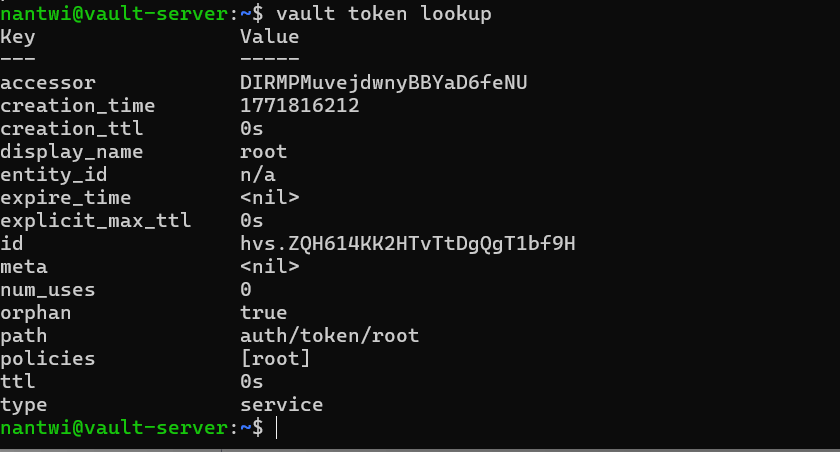
The starting point for any token work is checking what token you are currently using. The command:
vault token lookup
This returns the details of your active token — its TTL, policies, accessor, metadata, and more.
Lab: Creating a Token
To create a new token:
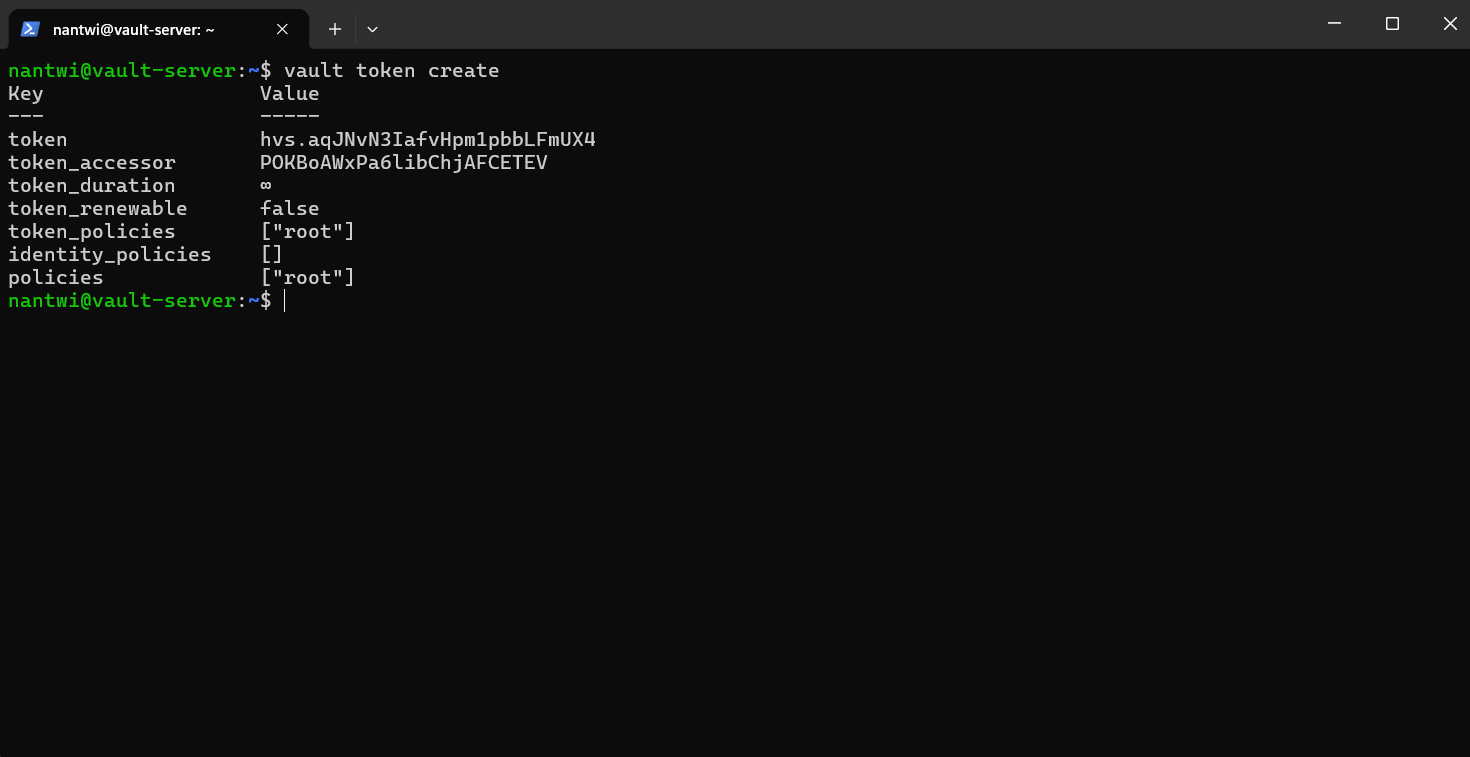
vault token create
Since I ran this as the root token (which has no expiry), the child token created also had no expiry. The output shows the new token value, accessor, and attached policies.
To inspect a specific token after creation:
vault token lookup <token>
To revoke a token:
vault token revoke <token>
Attaching a Policy at Creation
Policies can be attached at creation time using the -policy flag:
vault token create -policy=aws-s3-policy
Vault automatically attaches the default policy in addition to any explicitly specified policies. The named policy must already exist in Vault — you define it separately in the UI or via CLI and bind it during token creation.
Lab: Creating an Orphan Token
An orphan token has no parent. It will not be revoked if the token that created it is revoked. This is useful for long-running services that should not inherit lifecycle dependencies from their creator.
vault token create -policy=noble -ttl=1h -orphan
The -orphan flag removes the parent-child relationship. The created token now stands independently.
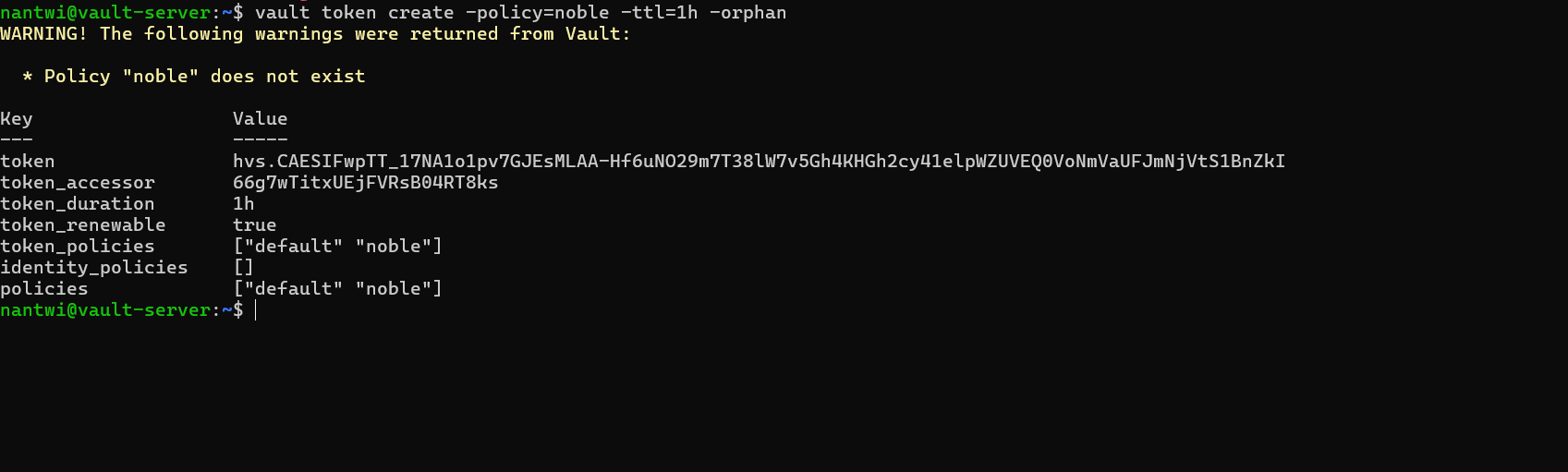
The token accessor shown in the output can be used to manage the token (look up, renew, or revoke) without needing the token value itself — useful for administrative operations.
Renewing a Token
To reset a token’s TTL back to its original duration:
vault token renew <token>
For example, to renew the orphan token created in the demo:
vault token renew <your-token-value>
This resets the TTL back to one hour from the time of renewal. The token must still be within its max TTL for renewal to succeed.
Token Commands Summary
| Command | What It Does |
|---|---|
vault token lookup |
Inspect the currently active token |
vault token lookup <token> |
Inspect a specific token |
vault token create |
Create a new child token |
vault token create -policy=<name> |
Create a token with a specific policy attached |
vault token create -ttl=1h |
Create a token with a specific TTL |
vault token create -orphan |
Create a token with no parent |
vault token revoke <token> |
Revoke a token immediately |
vault token renew <token> |
Renew a token’s TTL |
What’s Next
The next areas I want to explore:
- Vault Policies — defining granular access control using HCL policy documents
- Auth Methods — configuring AppRole, AWS IAM auth, and others beyond the root token
- Dynamic Secrets — generating short-lived credentials on demand directly from Vault
Tokens are the connective tissue of everything in Vault. Understanding their lifecycle, hierarchy, and attributes makes the rest of the system considerably easier to reason about.