Part of my ongoing journey through Bryan Krausen’s HashiCorp Vault for Absolute Beginners on Udemy. This session covered Vault Audit Devices — the mechanism Vault uses to log every interaction and give you full visibility into what is happening inside your Vault environment.
What Are Audit Devices?
Audit devices are a critical part of Vault’s security model. Every request made to Vault and every response Vault sends back gets recorded through the audit system. This gives you a clear, tamper-resistant trail of:
- Who accessed Vault
- When they accessed it
- What they requested
- How they authenticated
Audit logs are formatted in JSON, making them easy to parse and ingest into log management or SIEM platforms. One important thing to note: sensitive values such as tokens and secrets are hashed in the log output. This means the audit log is safe to store and share without inadvertently exposing secrets in plain text.
Audit devices are not enabled by default — you must explicitly configure them. Once enabled however, Vault takes them very seriously.
How Vault Treats Audit Devices
This is an important operational detail: if Vault cannot write to any of its enabled audit devices, it will stop responding to client requests entirely.
Vault will not complete a client request unless it can successfully write the audit log entry first. If the audit device is unreachable, full, or otherwise unavailable, Vault halts rather than proceed without an audit trail.
This design is intentional — it prioritises auditability over availability. The consequence is that audit device health is directly tied to Vault availability, which makes it critical to monitor.
Best practice: always enable more than one audit device. If one fails, Vault can write to the other and continue serving requests. A single audit device is a single point of failure for your entire Vault deployment.
Types of Audit Devices
Vault supports three types of audit devices, each suited to different environments and logging architectures.
1. File Audit Device
Writes audit logs to a file on disk. This is the most straightforward option and ideal for getting started or for environments where local log storage is acceptable.
A few things to keep in mind:
- Vault does not handle log rotation. You need to configure an external tool (such as
logrotateon Linux) to manage file size and rotation on the destination log path. - Logs can grow large quickly. Every single Vault request and response is recorded, so log management is critical. Monitor disk usage actively.
- Store logs off the server. If the Vault server crashes or is lost, you lose your audit trail. Ship logs to a centralised logging system or object storage as part of your disaster recovery strategy.
2. Syslog Audit Device
Integrates with the host operating system’s native syslog facility. This is useful when your infrastructure already routes syslog to a centralised logging pipeline.
One limitation: syslog sends to the local agent only. It does not send directly to a remote syslog server from Vault. You would still need a local syslog forwarder (like rsyslog or syslog-ng) to ship entries off the host.
3. Socket Audit Device
Sends audit logs to a Unix socket or TCP socket, where an external application or service can receive and process them in real time. This is ideal for distributed systems or environments that require live log streaming into a centralised analysis platform.
One important requirement: a service must be actively listening on the socket to receive the logs. If nothing is listening, Vault cannot write to the audit device and — as mentioned above — will halt until the issue is resolved. This makes socket reliability especially important to monitor in production.
Audit Device Commands
Listing Enabled Audit Devices
vault audit list
Lists all currently enabled audit devices. When you first set up Vault, this returns nothing — no audit devices are enabled out of the box.
vault audit list --detailed
Returns additional configuration details for each enabled audit device, including path, type, and options.
Enabling the File Audit Device
vault audit enable file file_path=/opt/vault/audit.log
This enables the file audit device and directs Vault to write all audit entries to /opt/vault/audit.log.
Lab: Enabling and Viewing Audit Logs
After enabling the file audit device, every request to Vault starts generating structured JSON log entries at the configured path.
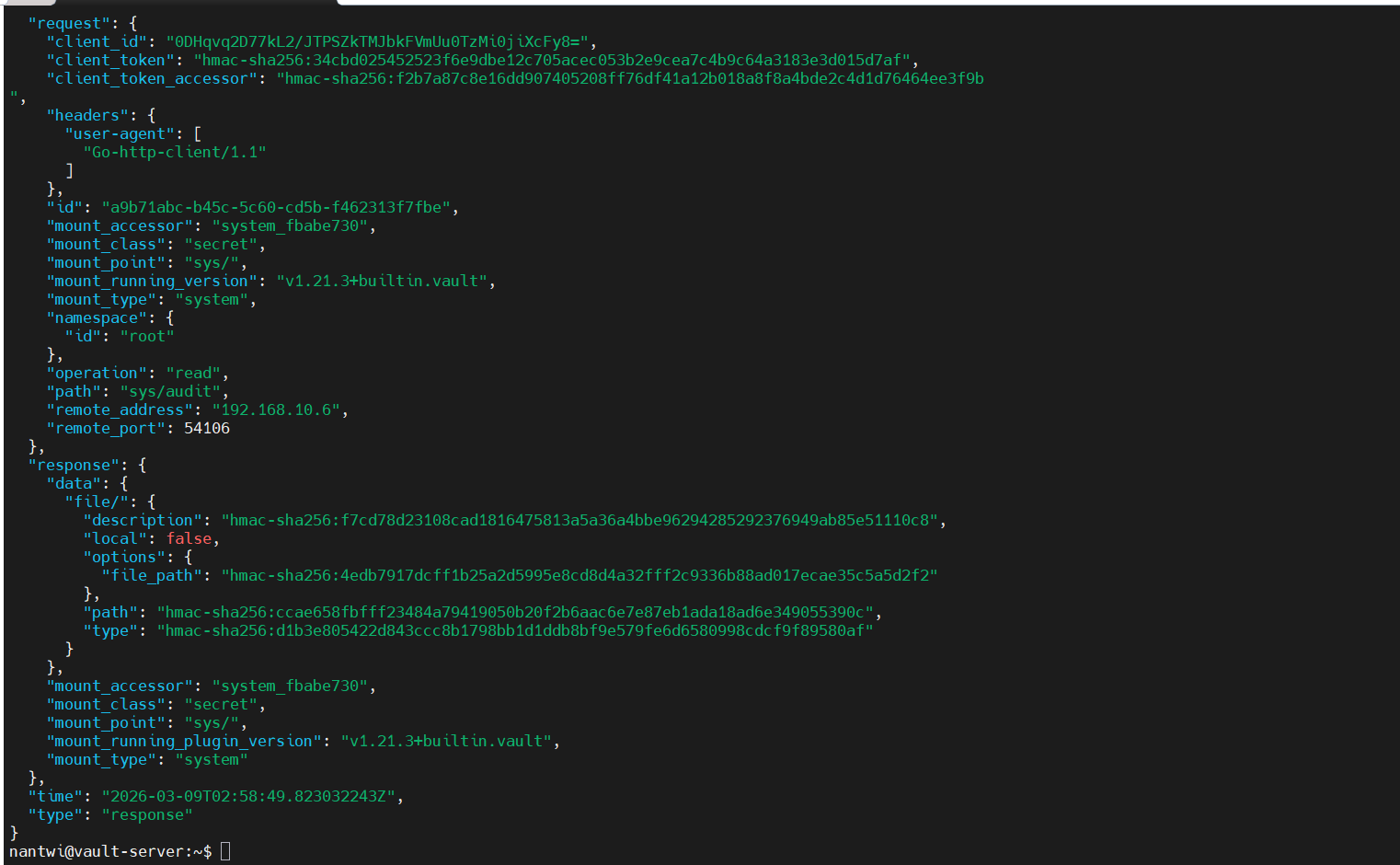
Each log entry captures the full request context — the token accessor, the operation type, the path accessed, the timestamp, and the response status. Sensitive fields like token values are hashed using HMAC-SHA256 rather than stored in plain text.
Commands Summary
| Command | What It Does |
|---|---|
vault audit list |
List all enabled audit devices |
vault audit list --detailed |
List audit devices with full configuration details |
vault audit enable file file_path=<path> |
Enable the file audit device at a specified path |
vault audit enable syslog |
Enable the syslog audit device |
vault audit enable socket address=<addr> socket_type=tcp |
Enable the socket audit device |
vault audit disable <path> |
Disable an audit device |
Key Takeaways
- Audit devices must be explicitly enabled — nothing is logged until you configure one
- Vault will go down if it cannot write to its audit log, so treat audit device health as a first-class concern
- Always run more than one audit device for resilience
- File audit devices require external log rotation and off-host log shipping for disaster recovery
- All sensitive data in logs is hashed, not stored in plain text
What’s Next
The next topic is Secret Engines — the core of what Vault is built for, covering how secrets are stored, generated, and managed across different backends.
Audit devices are easy to overlook in the rush to get Vault running, but they are what make Vault a compliant and accountable secrets management platform rather than just a key-value store.